English
Resource Panel
Read and save server-side resource preferences for a localization UID. Open the panel with the clipboard icon left of the title-bar settings gear.
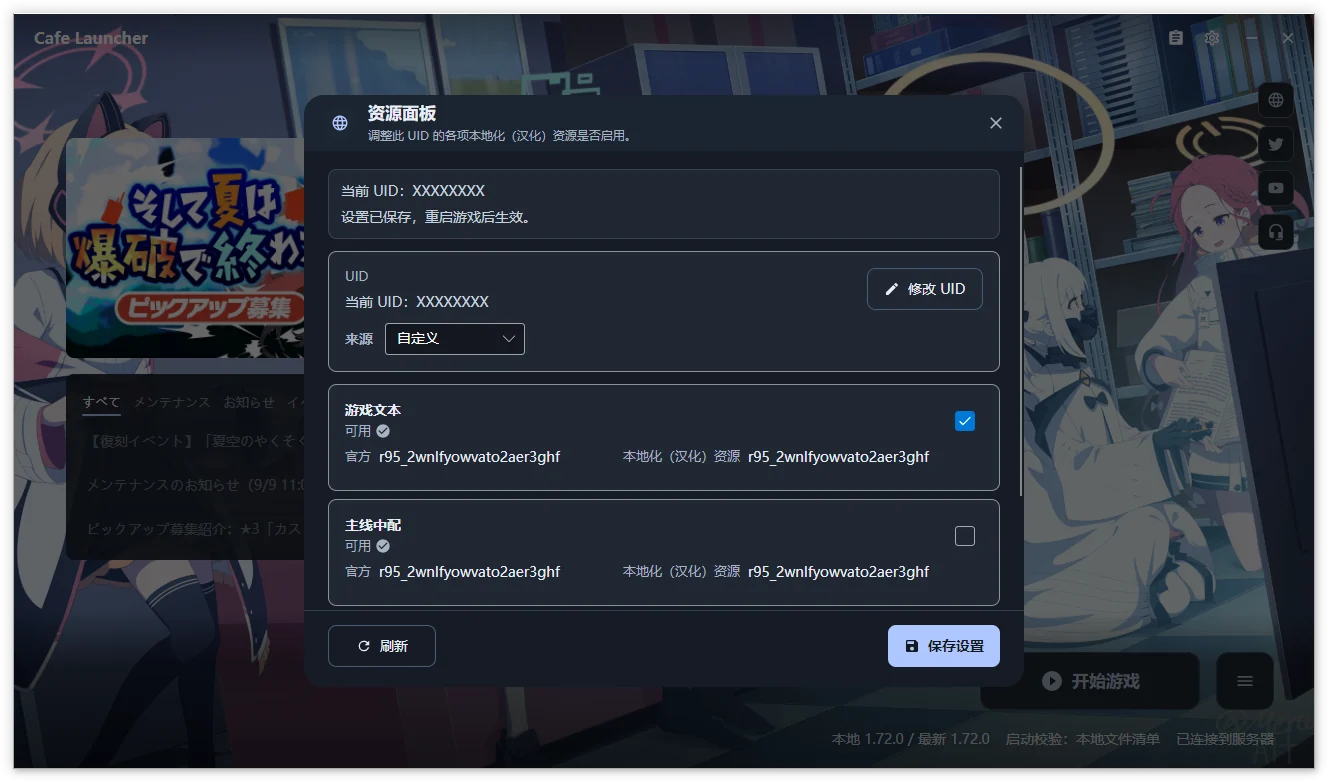
IMPORTANT
This requires the Cafe download source. On Official, the panel offers a source switch. Repair the game afterward when prompted so files match the new manifest.
UID
Use the eight-uppercase-letter localization UID, distinct from the numeric in-game account UID. ABCDEFGH illustrates the format.
| Source | Use |
|---|---|
| Automatic (default) | Read the local Cookie Library; on Windows, AppData/LocalLow/YostarJP/BlueArchive/Cookies/Library under the user profile; Linux reads the selected compatibility prefix |
| Custom | Enter a UID manually, then use Change UID to edit it |
If reading fails, enter the UID in the field and select Save UID. If it has not been generated yet, launch once with the Cafe download source, then refresh. The panel keeps a note explaining this requirement.
The source and manual UID are stored locally. Cookie reading only locates the relevant UID; the Cookie file is not uploaded.
Resource categories
| Category | Content |
|---|---|
| Game text | Chinese story, interface, item, and other text |
| Main-story Chinese voice | Chinese dubbing for the main story |
| Images and video | Chinese-localized image and video resources |
Each category has a separate switch and shows the official and localized resource versions. Matching versions show Ready; mismatches show Maintenance Pending. Pending resources remain selectable but may not match the current game version yet. Wait while loading, or select Refresh after a failure.
Save and apply
- Confirm the displayed localization UID is the intended one.
- Change resource switches.
- Select Save Settings and wait for success in the status strip.
- Restart the game to apply server preferences.
Refresh reads the current server state and versions. Saving requires networking and writes the switches for that UID; it does not directly modify local game files. Disable a category and save to use its original resources.
If closing the panel, refreshing, or changing the source would discard unsaved changes, the launcher asks for confirmation first. Switches cannot be edited while saving; on failure, the draft is kept so you can retry.
Changing the local UID does not delete the old server configuration. See the privacy policy (Chinese) for data requests. Screenshots show Chinese and may come from earlier versions.